New UI for company creation page
Moderate Upgrade
❗ Important: This feature is currently in Early Availability (EA) status. For more information on feature status, see Product lifecycle phases.
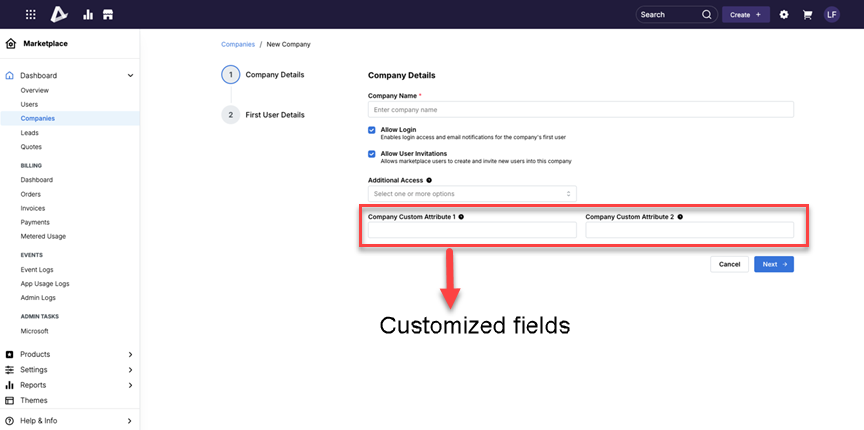
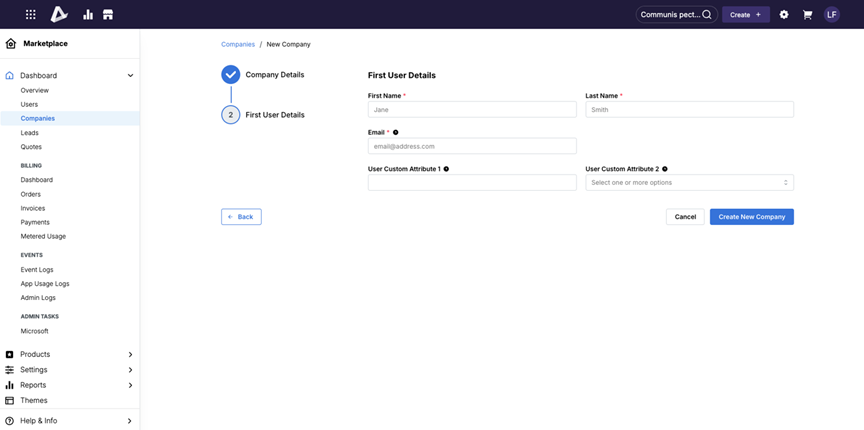
This release introduces a new micro UI for company creation, replacing the legacy single-page form with a modern, responsive experience built on the Mantine design system. The updated flow uses GraphQL for account creation and reduces the number of fields shown upfront by guiding users through a simpler two-step process. This improves usability, accessibility, and performance for users creating companies.
Key highlights
- Introduces a modern micro UI built on the Mantine design system and replaces the legacy single-page company creation experience.
- Reduces the number of fields shown on the initial screen.
- Improves usability, accessibility, and performance.
- Introduces a two-step flow:
- Step 1: Company details
- Step 2: Additional access configurations and first user details
- Company access types now use multi-select checkboxes to simplify input.
- Redirects users directly to the newly created company details page instead of the company listing page.
- Supports dynamic display of custom attributes when configured.
- Automatically hides the custom attributes section when no custom attributes are configured.
- Available to all roles already authorized to create companies.
UI updates
The company creation flow is available from:
- Companies listing > Create button
- Companies > Create company
Feature enablement
This feature is not enabled by default. Contact your AppDirect technical representative to request it.
Setting enablement
No setting enablement is required.
Documentation
Refer to the following:
- Create companies
- Create companies (Reseller)
Was this page helpful?
Tell us more…
Help us improve our content. Responses are anonymous.
Thanks
We appreciate your feedback!